Help/FAQ
How do I enable roaming on Android (Google Pixel and Oppo)?
In order to use your GoMoWorld plan on your Google Pixel device, you need to activate Roaming to allow you to connect abroad.
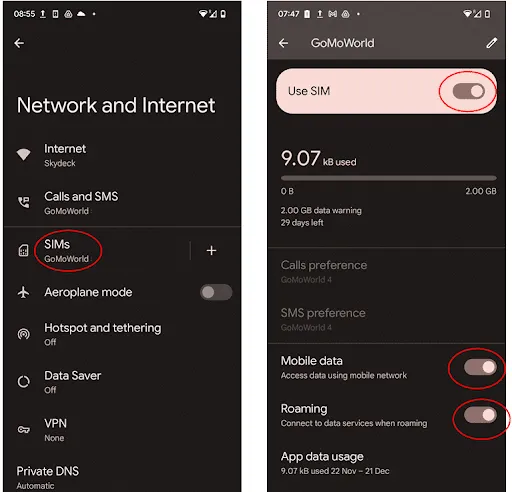
- First go to Settings and click Network and Internet
- Select SIMs
- Click on the GoMoWorld eSIM
- Ensure that “Roaming” is activated as shown below
How do I enable roaming on Android (Google Pixel and Oppo)?

How do I enable roaming on iOS?
How do I enable roaming on Android (Samsung, Motorola, …)?
How do I install a GoMoWorld eSIM on Android (Samsung, Motorola, …)?
How do I install a GoMoWorld eSIM on iPhone (iOS)?
Do I need an internet connection to install the eSIM?
Can I reuse my eSIM for future travel?
Can I use mobile data and hotspot/tethering with GoMoWorld?
What should I do when I return to my home country?
When does my GoMoWorld data plan start?
How do I enable roaming on Android (Google Pixel and Oppo)?
In order to use your GoMoWorld plan on your Google Pixel device, you need to activate Roaming to allow you to connect abroad.
- First go to Settings and click Network and Internet
- Select SIMs
- Click on the GoMoWorld eSIM
- Ensure that “Roaming” is activated as shown below
Need Support?
At GoMoWorld, we're here to help. Chat with our care team and we will be in touch very quickly.
