Help/FAQ
How do I install an eSIM on a Google Pixel device? (Android)
Reminder! To download your GoMoWorld eSIM, you need three things. Top tip – do this before you depart for the quickest way to get going:
- an internet connection (i.e. Wifi or other mobile data connectivity)
- a compatible handset (see section “Is my device compatible ?“)
- a GoMoWorld account and at least one purchased Plan (see Section “How do I buy and start a GoPlan ?“)
GoMoWorld eSIM must be installed from the GoMoWorld app. For instance, it’s not possible to add a GoMoWorld eSIM from the device settings menu:
“Add mobile plan” with a QR-code.
To install an eSIM on your Google Pixel device, follow these steps:
After purchasing your first GoPlan, the GoMoWorld app will direct you to install an eSIM with a dedicated button “INSTALL ESIM”
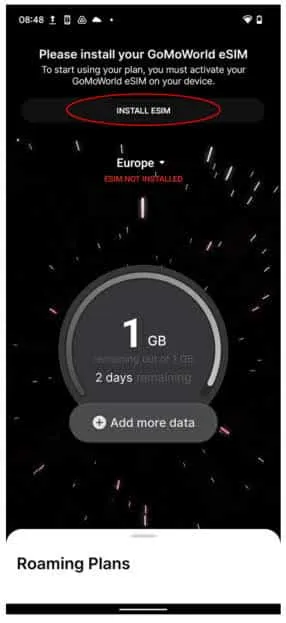
Pressing the “INSTALL ESIM” button will begin the process of creating your GoMoWorld eSIM
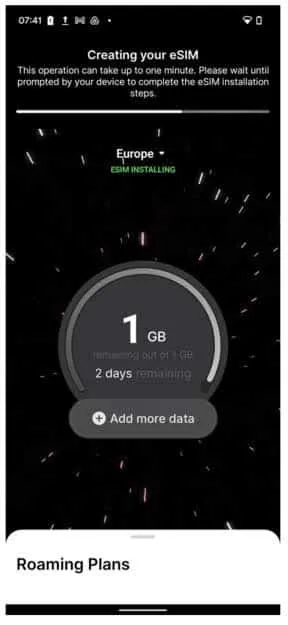
This process can take up to 2 minutes depending on your internet connection. Once your eSIM has been created, you’ll be prompted by your device to complete your GoMoWorld eSIM installation.
You need to allow the GoMoWorld app access on your device to let your eSIM to be installed on your device.
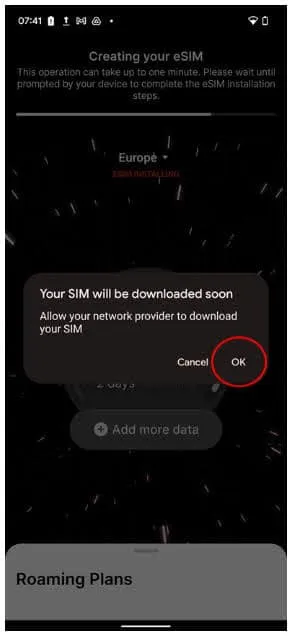
Once the eSIM installation is complete, you will be asked to check your device settings to finish the activation of your eSIM.
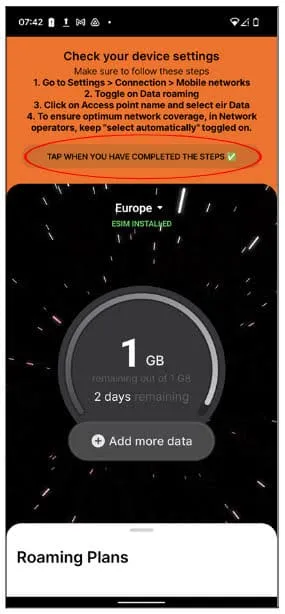
To complete the eSIM activation. Please check the following points:
- Open the phone settings
- Tap Network and Internet settings and selects SIMs
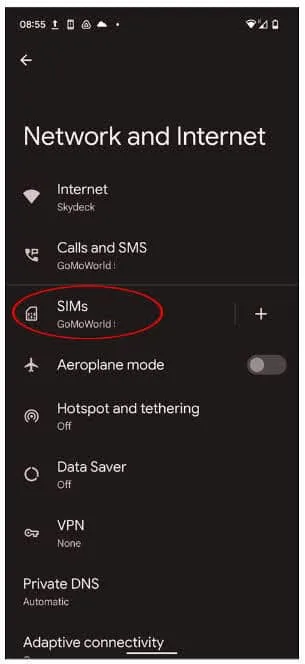
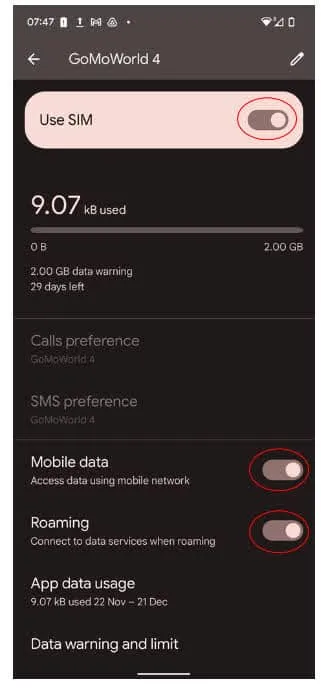
- Select the GoMoWorld eSIM
- Turn on Use SIM, Mobile data and Roaming
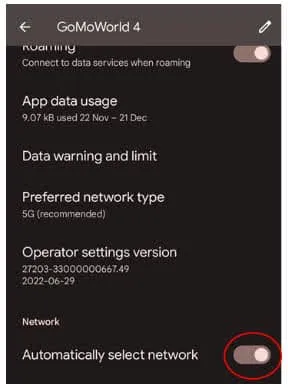
- You will then need to Turn on Automatically select network
- As a final check, we ask that you check the Access point names on the GoMoWorld eSIM to verify that they show as the below.
- If the settings show the below you are ready to use your GoMoWorld plan, if they do not show the below follow the next steps to complete your set up.
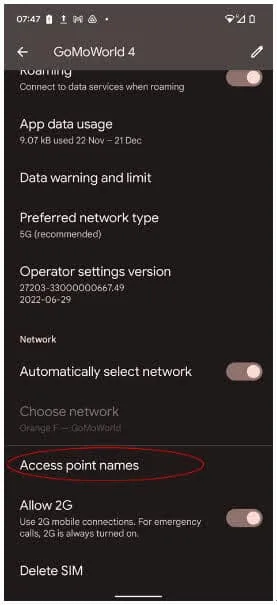
- Your access point names should display as the following;
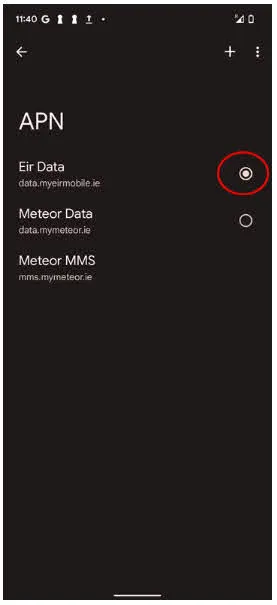
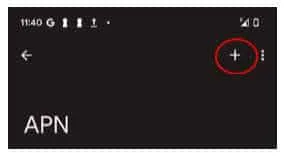
- If they do not display as the above, you will need to amend them. To amend the settings first you will need to click the + symbol
- You will need to input this information in these fields
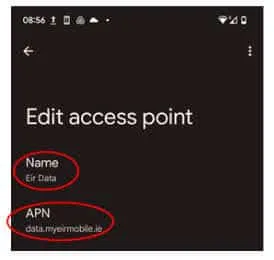
- Then Click save
- Your GoMoWorld plan will now be ready to use and as you have set up your eSIM you will not need to repeat these steps in the future.
Can I buy a data plan from abroad / while already traveling?

How do I buy and start a plan?
Can I change or cancel a scheduled plan start?
How do I check if my phone is eSIM-compatible?
How much data do I need for my trip?
What happens if I delete my eSIM before my scheduled plan start?
How do I download and install the GoMoWorld app?
Can I use my GoMoWorld eSIM and my home SIM card at the same time?
How do I create an account?
How do I install an eSIM on a Google Pixel device? (Android)
How many eSIMs can I install on my phone?
Which devices are compatible with GoMoWorld eSIM?
How do I log in to my account?
Can I use GoMoWorld on multiple devices?
Can I install my eSIM with a QR code?
Do I need to remove my physical SIM card to use GoMoWorld?
Will my home operator charge me if I make calls or receive texts while using GoMoWorld?
Can I schedule my plan to start at a specific date and time?
How do I use a promo code?
Do I need to download the app if I made a purchase on the website?
Can I use GoMoWorld if my phone is carrier-locked?
What is GoMoWorld and how does it work?
Will WhatsApp, iMessage and FaceTime still work with GoMoWorld?
When can I install my eSIM?
How do I install an eSIM on a Google Pixel device? (Android)
Reminder! To download your GoMoWorld eSIM, you need three things. Top tip – do this before you depart for the quickest way to get going:
- an internet connection (i.e. Wifi or other mobile data connectivity)
- a compatible handset (see section “Is my device compatible ?“)
- a GoMoWorld account and at least one purchased Plan (see Section “How do I buy and start a GoPlan ?“)
GoMoWorld eSIM must be installed from the GoMoWorld app. For instance, it’s not possible to add a GoMoWorld eSIM from the device settings menu:
“Add mobile plan” with a QR-code.
To install an eSIM on your Google Pixel device, follow these steps:
After purchasing your first GoPlan, the GoMoWorld app will direct you to install an eSIM with a dedicated button “INSTALL ESIM”
Pressing the “INSTALL ESIM” button will begin the process of creating your GoMoWorld eSIM
This process can take up to 2 minutes depending on your internet connection. Once your eSIM has been created, you’ll be prompted by your device to complete your GoMoWorld eSIM installation.
You need to allow the GoMoWorld app access on your device to let your eSIM to be installed on your device.
Once the eSIM installation is complete, you will be asked to check your device settings to finish the activation of your eSIM.
To complete the eSIM activation. Please check the following points:
- Open the phone settings
- Tap Network and Internet settings and selects SIMs
- Select the GoMoWorld eSIM
- Turn on Use SIM, Mobile data and Roaming
- You will then need to Turn on Automatically select network
- As a final check, we ask that you check the Access point names on the GoMoWorld eSIM to verify that they show as the below.
- If the settings show the below you are ready to use your GoMoWorld plan, if they do not show the below follow the next steps to complete your set up.
- Your access point names should display as the following;
- If they do not display as the above, you will need to amend them. To amend the settings first you will need to click the + symbol
- You will need to input this information in these fields
- Then Click save
- Your GoMoWorld plan will now be ready to use and as you have set up your eSIM you will not need to repeat these steps in the future.
Need Support?
At GoMoWorld, we're here to help. Chat with our care team and we will be in touch very quickly.
