Help/FAQ
I have installed my eSIM but my device says it is not compatible (Oppo)
In some instances where a GoMoWorld eSIM has been installed but deactivated an Oppo device may present a GoMoWorld is not compatible for this device banner.
To resolve this issue, we advise you to follow the below steps.
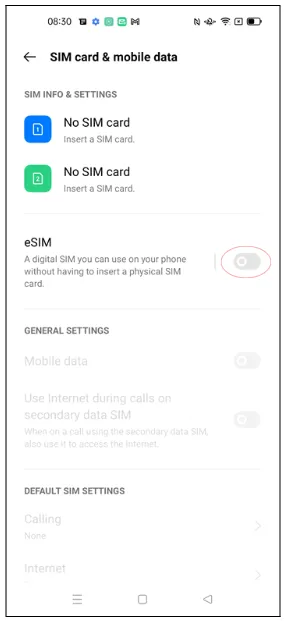
- Go to your device settings and select Sim Card & mobile data
- You will see your eSIM set to off, you will need to click on the button highlighted to enable your eSIM
- You will then need to click Enable on the pop up to confirm
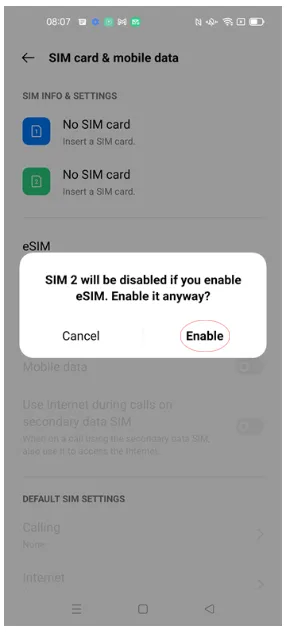
Once enable is selected you will now be able to access your GoMoWorld app and use the GoMoWorld service.
I can’t connect to the Internet (Android)

I can’t connect to the Internet (iOS)
The eSIM fails to install
I see “eSIM inactive” in the app
My eSIM was installed but it doesn’t work
The eSIM worked before but stopped suddenly
I have installed my eSIM but my device says it is not compatible (Oppo)
My data seems slow or unstable
How do I transfer my eSIM to a new phone?
I have installed my eSIM but my device says it is not compatible (Oppo)
In some instances where a GoMoWorld eSIM has been installed but deactivated an Oppo device may present a GoMoWorld is not compatible for this device banner.
To resolve this issue, we advise you to follow the below steps.
- Go to your device settings and select Sim Card & mobile data
- You will see your eSIM set to off, you will need to click on the button highlighted to enable your eSIM
- You will then need to click Enable on the pop up to confirm
Once enable is selected you will now be able to access your GoMoWorld app and use the GoMoWorld service.
Need Support?
At GoMoWorld, we're here to help. Chat with our care team and we will be in touch very quickly.
